- Gmail spam filters block 99% of the spam that usually makes it to your inbox. Although Outlook 2007 had a good spam filter, I still usually got around 2 or 3 emails a week sneaking into my inbox… not with Gmail.
- With Gmail you get to keep your old email account, and all incoming emails will be forwarded to your new Gmail account . Also, emails that you send from your new account will have your old email account in the from area.
- You can create Word docs, PDF’s and spread sheets with Gmail via the use of GoogleDocs.
- Gmail allows you to schedule events with the Google Calendar that will notify you by email to remind you of an appointment or meeting. It can also send a reminder to the person or persons that you will be meeting with.
- Gmail has something called ‘Stars’ and which allows you to tag emails you find important. You can actually do a search for ‘Starred‘ emails and they all pop up, and as quick as a normal google search!
- Your emails are tabbed into a thread, which means you no longer have to look for old emails… it is more like a conversation window.
- You can archive old emails or whole conversations so that you can keep your Inbox clear.
- You can set up filters and labels to keep your Inbox organised and clutter free.
- It has a fast, easy search function which means you will never lose an email again. The search is as fast a normal google search which is ace.
- All your emails are online which means that you access your emails from anywhere, not just one computer.
- Forgot to mention how much space there is with Gmail… you will never have to delete an email again.
- The ‘Canned Responses’ drafts feature is great. When you need to email something over and over, this function will save you a lot of time. justcreativedesign

Saturday, 7 January 2012
12 Good Reasons to Switch to Gmail

Wednesday, 4 January 2012
Google Chrome Frame - Enable open web technologies in Internet Explorer
Google Chrome Frame is an open source plug-in that seamlessly brings Google Chrome's open web technologies and speedy JavaScript engine to Internet Explorer. With Google Chrome Frame, you can:
Start using open web technologies—such as the HTML5 canvas tag—right away, even technologies that aren't yet supported in Internet Explorer 6, 7, 8, or 9.
Take advantage of JavaScript performance improvements to make your apps faster and more responsive.
Take advantage of JavaScript performance improvements to make your apps faster and more responsive.
Sunday, 1 January 2012
Top 50 Goolge Doodles from 2011
Every single day Google is present in our life. Being the number one search engine in the world, our needs are catered through it’s functional use. Personally I use Google for all my inquiries. What else can Google do to make my experience even more enjoyable? By providing beautifully designed doodles!
Almost every single day Google has a uniquely designed logo, which is often referred to as a doodle. Whether it’s an anniversary, birthday, holiday, or any other special occasion, Google’s team of illustrators and engineers are behind each and every doodle you see. These fun, surprising, spontaneous, and last but not least creative doodles, are the tiny things that make us smile.


.jpg)


.gif)


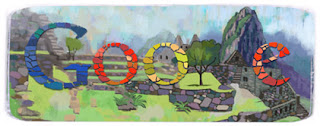


Almost every single day Google has a uniquely designed logo, which is often referred to as a doodle. Whether it’s an anniversary, birthday, holiday, or any other special occasion, Google’s team of illustrators and engineers are behind each and every doodle you see. These fun, surprising, spontaneous, and last but not least creative doodles, are the tiny things that make us smile.
So far the doodle team has managed to create over 1,000 doodles! Today for your inspirational needs, we have managed to gather Top 50 Google Doodles from 2011. The doodle team is always excited to hear ideas from users. So if you have a crazy idea that just might work, you can email proposals@google.com.


.jpg)


Subscribe to:
Posts (Atom)